
Is a Video Baby Monitor Worth It? Pros, Cons & Who Needs One
Last updated: November 12, 2026 · Product details checked on Amazon.com
Quick answer: For most families, a video baby monitor earns its price: you can check on your baby without opening the door and waking them, and it helps you decide whether a cry needs you or will settle on its own. A simple non-Wi-Fi monitor covers most needs. Smart Wi-Fi cameras add phone access and sleep data, but they cost more and need careful security settings.
An audio monitor tells you that your baby is making noise; a video monitor shows you why. That difference is what most parents pay for. Still, not every home needs one. In a small apartment where the nursery is a few steps away, an audio monitor or no monitor may be fine.
This guide weighs the real pros and cons, compares the main types of monitor, covers safety and privacy, and helps you decide what, if anything, to buy.


VTech No-WiFi Video Baby Monitor
An affordable, closed-system video monitor from a trusted baby brand, with long parent-unit battery life and solid range for most homes.
- No Wi-Fi
- Long video battery life
- Long rated range
- Night vision and two-way talk
- ✅ Budget price
- ✅ Reliable brand
- ✅ Long battery
- ❌ Basic image quality
Where This Guidance Comes From
This article combines common safe-sleep advice and monitor manufacturers’ safety instructions with product specifications and Amazon buyer comments. It’s general information, not medical advice. No baby monitor is a medical device or a substitute for safe-sleep practices, so talk to your pediatrician about any health concerns.
What Are the Benefits of a Video Baby Monitor?
The biggest benefits are peace of mind and fewer unnecessary trips into the nursery. You can see whether your baby has rolled, is standing in the crib, has lost a pacifier or is simply stirring. Two-way talk lets you soothe with your voice, and night vision shows the room clearly in the dark.
Many parents find video especially helpful during sleep training, when watching for a few minutes helps them decide whether to step in.
What Are the Downsides?
Video monitors cost more than audio models, and some parents find themselves watching the screen constantly, which can increase anxiety rather than reduce it. Wi-Fi cameras raise privacy questions and depend on your internet connection. Parent units need charging, and cheap models may have grainy images or short range.
Turning off motion alerts or lowering screen brightness at night can help if the monitor keeps you awake.
Wi-Fi vs No-WiFi Monitors: Which Is Better?
No-WiFi monitors use a dedicated parent screen and a closed radio link, so they work without internet and are harder to access remotely. Wi-Fi monitors stream to your phone, letting you check in from work or a date night, and often add smart features. Choose closed systems for simplicity and privacy, Wi-Fi for flexibility.
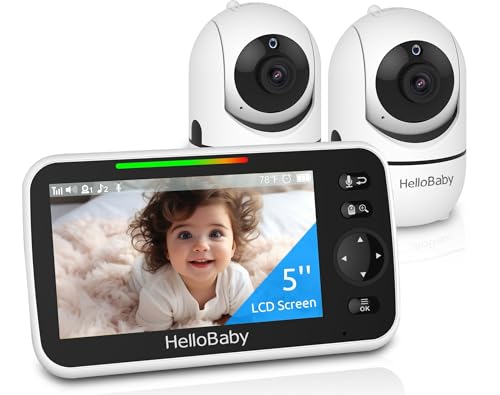

HelloBaby HB6550 No-WiFi Monitor (2 Cameras)
A private, closed-system monitor with a 5-inch parent screen and two cameras, ideal for families with two children or a nursery and playroom.
- No Wi-Fi, local connection
- Two cameras included
- 5 in parent unit
- Night vision and two-way talk
- ✅ Private by design
- ✅ Two rooms covered
- ✅ Simple setup
- ❌ No phone viewing away from home
For a deeper look at security features, read our guide to the safest baby monitor brand.
Do Smart Monitors With Sleep Tracking Help?
Smart cameras that track sleep patterns can give interesting insights into how long and how well your baby sleeps, which some parents find reassuring or useful for routines. They are not proven to prevent SIDS, and breathing or movement features should never replace safe-sleep practices.


Nanit Smart Baby Monitor with Floor Stand
A premium overhead Wi-Fi camera with sleep tracking and insights in an app, for data-minded parents who want analysis beyond live video.
- 1080p overhead view
- Floor stand mount
- Sleep tracking app
- Two-way audio
- ✅ Detailed sleep insights
- ✅ Excellent overhead angle
- ❌ Expensive
- ❌ Some features need subscription
Our Nanit Pro review explains these features in more detail.
Can You Use a Regular Security Camera Instead?
Yes, many parents use an inexpensive Wi-Fi security camera as a baby monitor. It’s cheap and streams to your phone, but there’s no dedicated parent screen, alerts can be slower, and it depends on Wi-Fi. It’s a reasonable budget choice for naps or as a second camera.


TP-Link Tapo C100 Wi-Fi Camera
A very low-cost Wi-Fi camera that streams to your phone; many parents use it as a DIY baby monitor, though it lacks a dedicated parent screen.
- 1080p video
- Phone app viewing
- Night vision
- Motion and sound alerts
- ✅ Cheapest option
- ✅ View from anywhere
- ❌ No parent unit
- ❌ Relies on Wi-Fi and phone
Comparison Table
| Product | Price Tier | Rating | Best For | Amazon |
|---|---|---|---|---|
| VTech No-WiFi Video Baby Monitor | Budget | 4.5/5 | Most families starting out | Check Price |
| HelloBaby HB6550 No-WiFi Monitor (2 Cameras) | Mid-range | 4.5/5 | Siblings or multiple rooms | Check Price |
| Nanit Smart Baby Monitor with Floor Stand | Premium | 4.2/5 | Sleep data and overhead view | Check Price |
| TP-Link Tapo C100 Wi-Fi Camera | Budget | 4.4/5 | Budget phone viewing | Check Price |
What Safety Rules Apply to Baby Monitors?
Position the camera so neither it nor its cable is within arm’s reach of the cot, a minimum of three feet away, and never place the camera or cord inside or on the crib rail. Secure cords to the wall with cord covers. Mount cameras on a wall or stable shelf where they can’t fall, and follow the manufacturer’s placement instructions.
Cord strangulation is a known hazard, so check placement again as your baby learns to stand and reach. Our guide on how to set up a baby monitor camera covers safe mounting.
How Do You Keep a Wi-Fi Monitor Secure?
Replace the factory login with a long, one-off passphrase, switch on two-step sign-in where available, keep firmware updated, and make sure your router uses modern encryption settings. Buy from established brands that publish security updates, and disable remote access if you don’t need it.
How Much Should You Spend?
Basic non-Wi-Fi video monitors start at budget prices and cover most families’ needs. Mid-range models add bigger screens, extra cameras and better night vision. Premium smart monitors cost considerably more and may require a subscription for full features. Decide which features you’ll actually use before paying for extras.
Compare top models in our guide to the best video baby monitor.
Who Needs a Video Monitor Most?
Families in larger homes, parents of twins or siblings sharing a room, those whose nursery is on a different floor, light sleepers who want to avoid unnecessary trips, and parents doing sleep training often benefit most. Families in small spaces may find an audio monitor enough.
Video Monitor vs Audio Monitor
Audio monitors are cheaper, simpler and have excellent battery life, and they’re enough if you only need to hear crying. Video monitors let you see what’s happening, which helps you avoid going in when your baby is just shuffling or talking. Many parents start with audio and upgrade if they find themselves checking in too often.
If your baby’s room is right next to yours and you can hear them clearly, an audio monitor may be all you need for the first months.
What Features Actually Matter?
Prioritise clear night vision, reliable range throughout your home, decent parent-unit battery life, two-way talk and the ability to adjust camera angle. Room temperature readouts and lullabies are nice extras. Smart analytics and multiple cameras matter only for specific family needs.
Check range claims against your home’s layout; thick walls and multiple floors reduce real-world range considerably.
How Long Will You Use a Baby Monitor?
Many families use a video monitor from birth through the toddler years, especially once children move to a big-kid bed and can wander. Some keep a camera in the playroom or use it later as a pet or home camera, which stretches the value of the purchase.
If you plan to have more children, a monitor that supports extra cameras can grow with your family.
Is It Okay to Watch the Monitor All Night?
You don’t need to. Constant watching can disturb your own sleep and increase worry. Set the monitor to sound-activated mode so the screen wakes when your baby cries, keep the volume at a level that alerts you to real waking, and rest while your baby sleeps.
If anxiety about your baby’s sleep is affecting you, talk to your pediatrician or healthcare provider; support is available.
Where Should You Place the Camera?
Mount the camera on a wall or high shelf with a clear view of the whole crib, angled down. Avoid pointing it at a bright window, which washes out the picture. Make sure the cord runs safely along the wall and is secured well out of reach.
An overhead angle gives the clearest view of whether your baby is sleeping or awake.
Do You Need a Subscription?
Basic non-Wi-Fi monitors never need a subscription. Some smart Wi-Fi monitors offer live video for free but charge for cloud recording, sleep analytics or extended video history. Check what’s included before buying, and factor ongoing fees into the true cost over two or three years.
If you only want live viewing, choose a model whose core features work without a paid plan.
Video Monitors for Twins and Siblings
Multi-camera systems let you switch between rooms or view a split screen, which is invaluable when two children nap at different times. Look for monitors that support adding cameras later. Placing cameras in each room avoids pointing one camera across a wide space where detail is lost.
Battery Life and Range
Parent units typically last a night or more in sound-activated mode but drain faster with the screen on continuously. Keep the charger beside your bed. Range varies with walls and floors; test the monitor in every room you plan to use it in during the return window.
Buying Checklist
Decide between closed and Wi-Fi systems, check range for your home, confirm night vision quality, decide whether you need one or more cameras, look for safe mounting options, and check for subscription fees. Those factors decide whether a video monitor fits your family and budget.
For privacy-focused setups, closed systems remain the simplest choice.
Can a Monitor Help Grandparents and Babysitters?
Yes. A simple parent screen with clear buttons is easy for grandparents or sitters to use without installing apps or sharing passwords. Closed systems are especially helpful here, since there’s nothing to log into. Leave a short note on how to adjust volume and use talk-back.
Monitors and Room Temperature
Many video monitors display the nursery temperature, which helps you dress your baby appropriately for sleep. Treat the reading as a guide, check your baby’s comfort directly, and follow safe-sleep advice on keeping the room comfortably cool and the crib clear of loose blankets.
When Is a Monitor Not Worth It?
If you room-share with your baby, live in a compact apartment where you can hear every sound, or tend to obsess over screens, a video monitor may add cost without much benefit. A basic audio unit or simply leaving doors open can work just as well in those situations.
Bottom Line: Is a Video Baby Monitor Worth It?
For most families, yes. A simple non-Wi-Fi video monitor gives peace of mind and saves unnecessary trips to the nursery. Choose Wi-Fi or smart models only if you need phone access or sleep data, secure them properly, follow cord-safety rules, and remember that no monitor replaces safe-sleep practices.
Frequently Asked Questions
Is a video baby monitor worth it?
For most families, yes; it offers peace of mind and fewer unnecessary nursery visits.
Is a Wi-Fi or non-Wi-Fi baby monitor better?
Non-Wi-Fi is simpler and more private; Wi-Fi allows phone viewing and smart features.
Do baby monitors prevent SIDS?
No. Monitors are not proven to prevent SIDS and don’t replace safe-sleep practices.
How far should a baby monitor be from the crib?
Keep the camera and cords at least 3 feet away, out of reach.
Can I use a security camera as a baby monitor?
Yes, as a budget option, though there’s no dedicated parent screen.
How do I stop a baby monitor being hacked?
Use strong passwords, two-factor authentication, updated firmware and secure Wi-Fi.
When can you stop using a baby monitor?
Many families stop in the toddler years once sleep is settled; there’s no fixed age.