

Best Baby Monitor With Camera (2026): HD, Wi-Fi and Hybrid Picks
Last updated: November 12, 2026 · Product details checked on Amazon.com
Quick answer: The best baby monitor with a camera for most parents is the Infant Optics DXR-8 PRO, which pairs a sharp 5-inch HD screen with clear, noise-reduced audio and no internet connection. For smart features and viewing from anywhere, the Nanit overhead camera leads. The VTech Smart WiFi gives you both a parent screen and an app, the eufy E21 offers the most detailed local image, and the ARENTI B2 is a lower-cost hybrid.
Camera monitors now range from simple screen-and-camera kits to smart cameras that track sleep patterns. This guide focuses on the step above basic budget monitors: models with sharper video, better audio, smarter features or the flexibility of app viewing. If you want the best value under $150, see our separate guide to the best video baby monitors under $150.
We compared monitors on image quality, audio clarity, connection type, smart features, range, battery life and the long-term experiences parents describe in reviews.
Our Top Picks
Best overall: Infant Optics DXR-8 PRO. Best smart Wi-Fi camera: Nanit. Best hybrid: VTech Smart WiFi. Sharpest local video: eufy E21. Best budget hybrid: ARENTI B2.


Infant Optics DXR-8 PRO
Premium non-Wi-Fi monitor with a 5-inch HD screen, interchangeable lenses and active noise reduction for clearer audio.
- 5 in HD display
- No Wi-Fi
- Active noise reduction
- Interchangeable lenses
- ✅ Sharp, private video
- ✅ Clear audio
- ✅ Long-trusted line
- ❌ No phone viewing
Infant Optics’ DXR-8 line has been a parent favourite for years. The PRO model upgrades to a 5-inch HD screen and adds active noise reduction, which filters out background hum from fans and white-noise machines so you hear your baby clearly. Interchangeable lenses let you choose a wide view or a closer shot. Because it uses a dedicated connection rather than Wi-Fi, it works even when your internet is down.
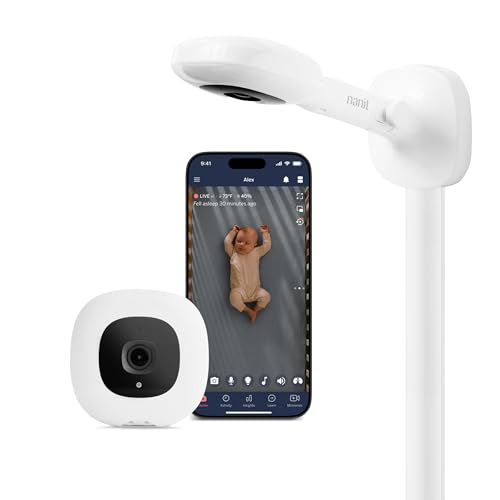

Nanit Smart Monitor (Wall Mount)
Overhead Wi-Fi camera with crisp 1080p app video and sleep tracking, mounted safely above the crib.
- 1080p Wi-Fi
- Overhead wall mount
- Sleep insights
- App viewing anywhere
- ✅ Best overhead view
- ✅ Smart sleep data
- ❌ Subscription for some features
- ❌ Needs strong Wi-Fi
Nanit’s overhead camera looks straight down into the crib, which gives the clearest view of your baby’s position and breathing movement. The app streams HD video to your phone and analyses sleep patterns over time. Some features require a subscription, and it relies on a strong home Wi-Fi signal. Our Nanit review covers it in detail.


VTech Smart WiFi Baby Monitor
Hybrid monitor with a dedicated parent screen plus app viewing when you’re away from home.
- 1080p camera
- Parent unit + app
- Pan and tilt
- Night vision
- ✅ Best of both worlds
- ✅ Reasonable price
- ❌ App reviews are mixed
Hybrid monitors give you a dedicated handheld screen for nights at home and an app for checking in from work or while travelling. The VTech Smart WiFi offers 1080p video, pan and tilt and night vision. It’s a practical middle ground if you want both options without buying two systems.
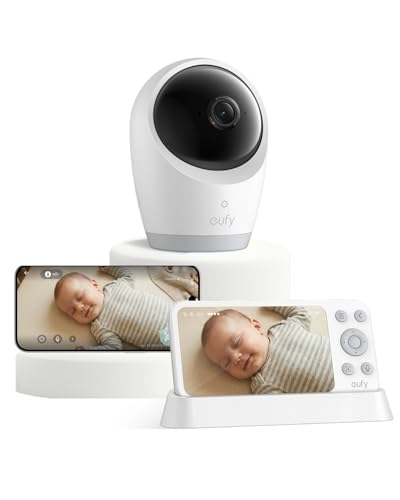

eufy Baby Monitor E21
High-resolution local monitor that pairs a 4K camera with a 5-inch 720p display, no internet required.
- 4K camera
- 5 in 720p screen
- No Wi-Fi
- Pan, tilt and zoom
- ✅ Very detailed image
- ✅ Private local link
- ❌ Newer, fewer reviews
eufy’s E21 pairs a 4K camera with a 5-inch screen and a closed local connection. The high-resolution camera allows clear digital zoom on your baby’s face. It’s newer, with fewer reviews than established models, but early feedback praises image quality.


ARENTI B2 Wi-Fi Camera Kit
Budget-friendly hybrid kit with a 1080p Wi-Fi camera, app access and a 5-inch display.
- 1080p
- Wi-Fi + display
- App viewing
- Two-way talk
- ✅ Hybrid at a lower price
- ❌ Lesser-known brand
ARENTI’s kit combines a Wi-Fi camera with a 5-inch display, offering hybrid convenience at a lower price than bigger brands. It’s a lesser-known brand, so pay close attention to account security and firmware updates.
Comparison Table
| Product | Price Tier | Rating | Best For | Amazon |
|---|---|---|---|---|
| Infant Optics DXR-8 PRO | Premium | 4.6/5 | Clear video and audio, no Wi-Fi | Check Price |
| Nanit Smart Monitor (Wall Mount) | Premium | 4.5/5 | Viewing from anywhere and sleep insights | Check Price |
| VTech Smart WiFi Baby Monitor | Mid-range | 4.1/5 | Parent screen plus phone app | Check Price |
| eufy Baby Monitor E21 | Premium | 4.1/5 | Detail without the internet | Check Price |
| ARENTI B2 Wi-Fi Camera Kit | Mid-range | 4.2/5 | App and screen for less | Check Price |
Wi-Fi, Non-Wi-Fi or Hybrid?
Non-Wi-Fi monitors use a private radio link between camera and parent unit, so they work without internet and avoid online security risks. Wi-Fi cameras let you watch on your phone from anywhere and often add smart features. Hybrids combine a parent unit with app access.
Consider how you’ll use it. If you’re home with your baby and want simplicity, non-Wi-Fi is ideal. If you travel or work away and want to check in, Wi-Fi or hybrid makes sense. Our guide to the safest baby monitor brands explains how to keep Wi-Fi monitors secure.
Image Quality and Night Vision
Look for HD (720p or higher) on the parent screen, or 1080p and above for app cameras. Infrared night vision is standard; better models show clear black-and-white detail in a dark room without bright IR glare. Zoom, pan and tilt help you follow a baby who moves around the crib.
Screen resolution matters as much as camera resolution. A 4K camera feeding a low-resolution screen won’t look sharper than the screen allows, though it does improve digital zoom.
Audio Quality Matters Too
Parents often focus on video, but audio is what wakes you at night. Look for clear two-way talk, sound-activated alerts and noise reduction that filters out fans and white-noise machines. A parent unit that lights up with sound levels lets you keep the volume low while still noticing activity.
Many families run a sound machine in the nursery all night, which can drown out a baby’s cries on monitors without noise filtering. Active noise reduction, like that on the DXR-8 PRO, separates the steady background sound from your baby’s voice. Some apps let you set sensitivity thresholds so you’re alerted only to louder sounds.
Range and Battery Life
Non-Wi-Fi monitors typically reach several hundred feet in open space, but walls and floors reduce that considerably. Parent-unit battery life varies widely, from a few hours with the screen on to a full night in audio-only or power-saving modes.
Test the monitor in your actual home, including the rooms farthest from the nursery, before the return window closes. Screen-off or “vox” modes, which wake the display only when sound is detected, stretch battery life overnight. Wi-Fi cameras have no range limit beyond your internet connection but drain your phone’s battery if you stream continuously.
Smart Features: Helpful or Hype?
Smart cameras can track sleep, record highlights, measure room temperature and humidity and send alerts. These features can be reassuring and interesting, but they aren’t medical devices and shouldn’t replace safe sleep practices. Decide which features you’ll actually use before paying extra or subscribing.
Sleep analytics appeal to data-minded parents who want to spot patterns, such as how bedtime routines affect night waking. Others find constant alerts stressful. Most apps let you turn off notifications you don’t want, so you can keep the core video feed and ignore the rest.
Multiple Cameras and Growing Families
If you have more than one child or want to watch a playroom too, choose a system that supports additional cameras. Many monitors let you add cameras later and switch between them or show a split screen.
Check whether extra cameras are sold separately and what they cost, since an inexpensive starter kit can become pricey once you add a second camera. App-based systems often make multiple cameras easier to manage, while parent-unit systems may limit how many feeds you can view at once.
Mounting and Placement
Overhead wall mounts and floor stands give the best view and keep cords away from the crib. Tabletop placement on a dresser works too, provided it’s at least three feet away. Avoid placing cameras where your baby could reach them as they start to stand.
Our step-by-step guide on setting up a baby monitor camera covers mounting heights, angles and cable management in more detail.
Premium vs Budget Camera Monitors
Budget monitors cover the essentials: a camera, a screen, night vision and two-way talk. Premium monitors add sharper screens, better audio processing, longer range, interchangeable lenses, smart features and more polished apps. The extra cost pays off most for parents who rely on the monitor every night for a year or more.
If your budget is tight, a well-reviewed budget monitor is perfectly adequate and much better than none. If you can stretch, the improvement in clarity and reliability is noticeable on those 3 a.m. checks, when you want to see at a glance whether your baby is settling or awake.
How Long Will You Use a Baby Monitor?
Most families use a camera monitor from birth until their child is two to four years old, and some keep using cameras as playroom or pet monitors afterwards. A monitor with add-on cameras and good app support can stay useful for years.
Wi-Fi cameras can be repurposed as general home cameras once your child no longer needs monitoring, while parent-unit systems are usually retired or passed on. Factor that long-term flexibility into the value of a more expensive model.
How We Evaluated It
We based this list on manufacturer specifications, pricing at the time of writing and recurring themes in parent feedback, rather than our own hands-on testing. Image and audio clarity, connection reliability, battery life and app stability carried the most weight.
We downgraded monitors with frequent reports of dropped connections, unreliable apps or parent units that stop holding a charge.
Room Temperature and Comfort Alerts
Many camera monitors display the nursery temperature, and some show humidity too. Paediatric guidance suggests keeping a baby’s room comfortably cool and dressing your baby in light layers, so a temperature readout helps you adjust heating or cooling without entering the room.
Built-in sensors can read slightly differently from a wall thermostat because of their position near the camera. Use them as a guide to changes over the night rather than an exact measurement, and compare against a separate room thermometer if accuracy matters to you.
Is a Camera Monitor Worth It?
Many parents find the ability to check visually, without opening the door and risking waking the baby, worth the cost. Others manage well with audio-only monitors. Our article on whether a video baby monitor is worth it weighs both sides.
If you live in a larger home, have a baby who wakes often or simply feel more relaxed seeing your child, a camera monitor is a worthwhile investment. In a small apartment where you can hear every sound, it may matter less.
Setting Up Alerts Without Overload
Start with sound alerts only, at moderate sensitivity, and add motion or temperature alerts if you find them useful. Too many notifications quickly become noise, and parents tend to ignore them.
Review settings after the first week, once you know your baby’s normal sounds and movements, and fine-tune sensitivity so you’re woken only when it matters.
Charge the parent unit during the day so it lasts through every night feed.
Bottom Line: Best Baby Monitor With Camera
The Infant Optics DXR-8 PRO is the best choice for most parents, with sharp HD video, excellent audio and a secure non-Wi-Fi link. Choose Nanit for smart sleep insights and phone viewing, VTech Smart WiFi or ARENTI for hybrid flexibility, and the eufy E21 for the most detailed local image.
Frequently Asked Questions
What is the best baby monitor with a camera?
The Infant Optics DXR-8 PRO for most parents; Nanit for smart Wi-Fi features.
Do I need a Wi-Fi baby monitor?
Only if you want to view from your phone or away from home.
What is a hybrid baby monitor?
A monitor with both a dedicated parent screen and app viewing over Wi-Fi.
Is 4K worth it in a baby monitor?
It mainly improves digital zoom; screen resolution limits what you see on the parent unit.
Do smart baby monitors need a subscription?
Some features on brands like Nanit require one; basic viewing usually doesn’t.
Where should a baby monitor camera go?
At least 3 feet from the crib with cords secured out of reach.