

Safest Baby Monitor Brands (2026): Privacy, Security and Cord Safety
Last updated: November 12, 2026 · Product details checked on Amazon.com
Quick answer: The safest baby monitors for privacy are non-Wi-Fi models such as VTech, HelloBaby and GoodBaby, because they use a closed connection between the camera and parent unit with no internet exposure. If you want to watch from your phone, a reputable Wi-Fi brand like Nanit can be secure when you use a strong unique password, enable two-factor authentication if offered and keep firmware updated. Whatever the brand, mount the camera and its cords well out of the baby’s reach.
“Safe” means several things when it comes to baby monitors. Parents worry about hackers accessing a camera, about where video is stored, about cords near the crib and, sometimes, about radio emissions. No brand can guarantee perfect safety, but some designs reduce risk far more than others, and setup choices matter as much as the brand you buy.
We looked at how popular monitors connect, what data they send to the internet, their security features, the reputation and longevity of the brand, cord and mounting design and verified owner feedback.
Our Top Picks
Safest overall (no Wi-Fi): VTech. Best value two-camera (no Wi-Fi): HelloBaby HB6550. Best budget (no Wi-Fi): GoodBaby 5″. Best secure smart monitor (Wi-Fi): Nanit.


VTech No-WiFi Video Baby Monitor
Closed-system monitor from a long-established brand, with long range and battery life and no internet connection.
- No Wi-Fi
- Up to 1000 ft range
- Night vision
- Two-way talk
- ✅ No internet exposure
- ✅ Long battery life
- ✅ Trusted brand
- ❌ No phone viewing
VTech has made baby monitors for many years, and its non-Wi-Fi models connect the camera directly to the parent unit using a dedicated radio link. Because nothing goes over the internet, there’s no cloud account to breach and no app to hack remotely. Owners praise the long range and battery life, making it practical in larger homes.
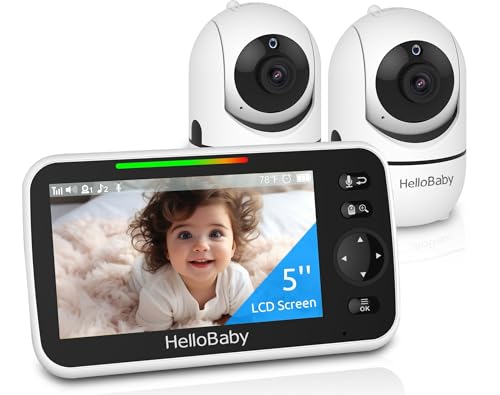

HelloBaby HB6550 2-Camera Monitor
Popular non-Wi-Fi monitor with a 5-inch screen and a second camera for siblings or a playroom.
- No Wi-Fi
- 2 cameras
- 5 in screen
- Pan/tilt
- ✅ Great value
- ✅ Two rooms covered
- ❌ Basic image quality
HelloBaby’s HB6550 is one of the best-selling non-Wi-Fi monitors on Amazon. It includes two cameras with pan and tilt, so you can watch two children or two rooms on one screen. Image quality is basic compared with HD Wi-Fi cameras, but the privacy benefit of a closed system is significant.


GoodBaby 5" No-WiFi Baby Monitor
Affordable local-only monitor with a clear 5-inch display and simple controls.
- No Wi-Fi
- 5 in screen
- Night vision
- Temperature display
- ✅ Simple and private
- ✅ Budget price
- ❌ Limited extras
GoodBaby’s 5-inch monitor offers the essentials, including night vision, two-way talk and room temperature, without connecting to the internet. It’s a sensible choice if you want privacy and simplicity at a low price.


Nanit Smart Baby Monitor
Wi-Fi smart monitor with HD video, app viewing and sleep insights from a brand focused on baby tech.
- 1080p Wi-Fi camera
- App viewing
- Sleep tracking
- Floor stand
- ✅ View from anywhere
- ✅ Advanced insights
- ❌ Requires strong account security
- ❌ Subscription for some features
If you want to check on your baby from work or another room using your phone, you need a Wi-Fi monitor. Nanit focuses on baby tech and offers HD video, app access and sleep insights. With any Wi-Fi monitor, safety depends heavily on your account security: use a unique password, enable extra login protection where available and install updates promptly.
Comparison Table
| Product | Price Tier | Rating | Best For | Amazon |
|---|---|---|---|---|
| VTech No-WiFi Video Baby Monitor | Mid-range | 4.5/5 | Maximum privacy | Check Price |
| HelloBaby HB6550 2-Camera Monitor | Budget | 4.5/5 | Siblings or two rooms | Check Price |
| GoodBaby 5" No-WiFi Baby Monitor | Budget | 4.5/5 | Simple and private | Check Price |
| Nanit Smart Baby Monitor | Premium | 4.2/5 | Phone viewing with security features | Check Price |
Wi-Fi vs Non-Wi-Fi: Which Is Safer?
Non-Wi-Fi monitors are inherently more private because they never connect to the internet. Their main risk is someone nearby intercepting the signal, which is unlikely with modern digital encrypted links. Wi-Fi monitors offer remote viewing and smart features but introduce internet risks such as weak passwords, reused credentials and unpatched firmware.
Most reported baby monitor “hacks” have involved Wi-Fi cameras with default or reused passwords, rather than sophisticated attacks. That means simple steps prevent most problems. If you choose Wi-Fi, buy from an established brand that releases regular security updates and offers strong login options.
How to Secure a Wi-Fi Baby Monitor
Create a long, unique password for the monitor’s account, turn on two-factor authentication if the brand offers it, keep the app and camera firmware updated, secure your home Wi-Fi with WPA2 or WPA3 and a strong router password, and review which devices and people have access to the account.
Avoid buying second-hand Wi-Fi cameras unless you can fully reset them and register them to your own account. Be cautious with very cheap, unknown brands that may stop releasing updates. If your router supports it, placing smart home devices on a separate guest network adds another layer of protection.
Cord and Placement Safety
Mount the camera at least 3 feet from the crib and keep every cord well out of reach. Strangulation from monitor cords is a documented hazard, so never place the camera on the crib rail or let cables dangle near the cot. Use cord covers or wall mounts supplied with the monitor.
Some brands supply floor stands or wall mounts with cable channels designed to keep cords hidden. Check periodically as your baby grows, because a toddler who can stand or climb has a much larger reach than a newborn.
What Makes a Baby Monitor Brand Trustworthy?
A trustworthy brand has a long track record, publishes clear privacy and security information, releases regular firmware updates, responds quickly to reported vulnerabilities and offers accessible customer support. These signals matter more than marketing claims about “military-grade” encryption.
Before buying, look at the brand’s website for a security or privacy page that explains how video is transmitted and stored. Check whether the company has a history of issuing updates for older models, or whether products are abandoned after a year. Brands that sell through major retailers and have been in the baby category for many years generally have more to lose from a security failure and invest accordingly.
Be wary of no-name cameras that appear and disappear from marketplaces under changing brand names. They may be cheap, but they often lack ongoing updates, clear data policies or a way to contact the manufacturer if something goes wrong.
Cloud Storage and Privacy Policies
Many Wi-Fi monitors upload video clips or sleep data to the cloud to power app features. Read the privacy policy to understand what is stored, for how long, who can access it and whether you can delete it. Non-Wi-Fi monitors avoid this entirely because nothing leaves your home.
Cloud features like sleep analytics and recorded highlights can be genuinely useful, but they come with trade-offs. If you’re comfortable with them, choose a brand that lets you control retention periods and delete your data on request. If you’d rather keep footage private, turn off optional cloud features or choose a local-only monitor.
Sharing access with grandparents or a nanny is convenient, but each extra account is another potential weak point. Use the app’s built-in sharing tools rather than sharing your own password, and remove access when it’s no longer needed.
Audio-Only vs Video Monitors
Audio-only monitors are simple, inexpensive and naturally private, but you can’t see whether your baby is settling or simply making noise. Video monitors let you check visually without entering the room, which many parents find reassuring. Both can be used safely if placed correctly.
Some parents start with a video monitor for the newborn months and switch to audio later. Others use video throughout the toddler years to keep an eye on climbing attempts. Choose based on your home layout, your comfort level and how much reassurance you want.
Wearable and Breathing Monitors
Wearables and breathing sensors claim to track a baby’s movement, heart rate or oxygen levels. The American Academy of Pediatrics has said that consumer monitors should not be used as a strategy to reduce the risk of sudden infant death. Following safe sleep guidance remains the most important protection.
If you do use a sensor-based product, treat it as an extra comfort rather than a medical device, and speak to your paediatrician if you have specific health concerns about your baby. False alarms are common with some products and can add anxiety rather than reduce it.
Setting Up a Monitor Safely, Step by Step
Unbox and charge the parent unit, choose a camera spot at least 3 feet from the crib, mount it on a wall or shelf with cords secured, pair the camera and test the picture and sound from the rooms where you’ll use it. For Wi-Fi models, create your account with a unique password and update firmware before first use.
Test range by walking through your home and garden with the parent unit while someone makes noise in the nursery. Thick walls, floors and appliances can weaken the signal. If coverage drops, reposition the camera or parent unit, or choose a model with a longer range. Our guide on setting up a baby monitor camera covers mounting heights and angles in detail.
How We Evaluated It
This guide draws on manufacturer specifications, published security and privacy information, advice from paediatric bodies and patterns we noticed across many verified parent reviews, not hands-on penetration testing. We weighed connection type, brand reputation, update history, cord design and reliability.
We gave particular weight to how each type of monitor reduces risk by design, since a closed local system removes whole categories of online threats, while a Wi-Fi system depends on good habits from both the manufacturer and the parent.
Signs Your Monitor May Be Compromised
Warning signs for a Wi-Fi monitor include the camera moving on its own, unfamiliar voices from the speaker, settings changing unexpectedly, unknown devices in the account and login alerts you didn’t trigger. If you notice any of these, disconnect the camera, change your password, enable extra login protection and contact the manufacturer.
After securing the account, reset the camera to factory settings, update its firmware and check your router for unfamiliar connected devices. Changing your Wi-Fi password at the same time closes any remaining gap.
Battery and Power Safety
Use only the charger and power adapter supplied with the monitor, keep parent units off soft bedding while charging, and replace swollen or damaged batteries promptly. Avoid running extension cords across the nursery floor, where they can be tripped over or pulled.
Plug the camera into an outlet behind furniture or high on the wall where possible, so curious toddlers can’t reach the plug or cable.
Bottom Line: Safest Baby Monitor Brand
For maximum privacy, choose a non-Wi-Fi monitor from a reputable brand such as VTech, HelloBaby or GoodBaby. If you need phone access, choose an established Wi-Fi brand like Nanit and protect your account with a strong unique password, extra login protection and regular updates. Whatever you buy, mount the camera away from the crib with cords secured.
Frequently Asked Questions
Which baby monitor brand is safest?
Non-Wi-Fi monitors from brands like VTech and HelloBaby are the most private; reputable Wi-Fi brands can be secure with good account protection.
Can baby monitors be hacked?
Wi-Fi monitors can be if passwords are weak or firmware is outdated; non-Wi-Fi models avoid internet risks.
Are non-Wi-Fi baby monitors safer?
For privacy, yes, because they never connect to the internet.
How far should a baby monitor be from the crib?
At least 3 feet, with cords completely out of reach.
Do baby monitors give off harmful radiation?
They emit low-power radio signals; placing the camera at a distance from the crib also reduces exposure.
Should I buy a used Wi-Fi baby monitor?
Only if you can fully reset it and register it to your own account.